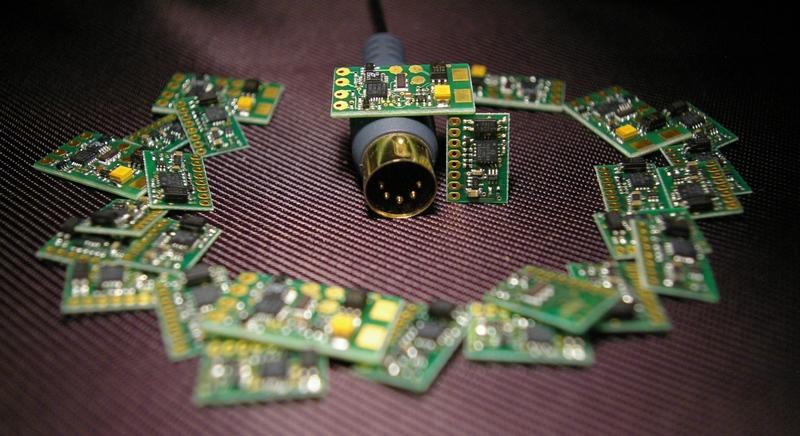
> MIDI2CV converter - specifications and ordering info
MIDImplant is a special circuit needed when you want to control your older analog synthesiser with MIDI. As long as your instrument has volt/oct response (in contrary to Hz/volt) you can use this little board. It's calibrated at 1V/oct, but any ratio is possible, from 0.3V/oct to 2V/oct. Hz/V response will be available too, as one of the features of new firmware being under development now. You only need to drill a hole for MIDI DIN socket, and connect a few wires inside your synthesizer. Basic soldering skills are needed as well as a bit of knowledge about your synth. Its service manual, or at least schematic is most helpful. CAPABILITIES
Both CV outputs are monophonic, that means each of them can control one oscillator. They use last-played note priority. It means that whatever the note was played, it's immediately converted into proper voltage, regardless of the keyboard state before hitting the new key (if there were other keys pressed or not). If some of pressed keys are then released, CV output changes to represent the highest remaining note currently played on the keyboard. If the last key is released, CV remains at the level as before the release. Although this description may not seem obvious, described mode of operation is probably the most intuitive way of controlling pitch for monophonic analog synths.
INSTALLATION:
In order to install this device you need to find some key points inside your to-be-MIDIfied instrument: power supply output (between 6 and 15V), ground (0V), and control voltage (CV+GATE) inputs. Most important is Voltage Control pitch input of your synth oscillator, or a point in the circuit where you can add it (usually it takes just one resistor to have CV input). Another important voltage is GATE signal, that drives the envelope generator. GATE is activated whenever a key is pressed on a keyboard, while CV input tells the instrument about the pitch to be played. MIDImplant module provides 2 pairs of such signals. That means you can control 2 oscillators, or make just one oscillator MIDI controlled, together with other control like most common VCF cutoff frequency.
This picture gives you idea of the size and destination of this board. It is designed to be mounted on MIDI-IN socket only, no additional mechanical assembly is required. Just slide it inside thru the hole and secure the MIDI socked with use of 2 screws. Not shown are cables, which must be soldered inside the synth. Those are: GND, power supply (6 to 15V), 2 CVs, 2 Gates, and the one for "setup" button
USER SETTING
Thanks to user friendly MIDI-learn function, you only need to press the EDIT button once, and generate the MIDI event you want to associate with CV output. For example to setup it as note+velocity, press the EDIT button once, and play the lowest note on your MIDI keyboard. The module is ready to work with your keyboard since then.
User settings are of course stored in nonvolatile memory, so you don't have to mount any button for setup. Just use a piece of wire connected to GND to activate edit mode during installation, any you will never need to change it again after you close the synth case.
| payment details | |
| BANK TRANSFER |
LUKAS Bank SA, pl. Orlat Lwowskich 1, 53-605 Wroclaw, Poland IBAN: PL57 1940 1076 3027 4037 0000 0000 account owner name: Roman Sowa BIC/SWIFT: LUBWPLPRXXX |
| Make the payment of 80EUR from your local bank to above details. Use your name or email in payment description to identify your payment | |
|
|
| click the button and you'll be redirected to secure website for payment processing. if you already have moneybookers account, you know the drill, all you have to do is to provide your login details. If not, you can register for free, and besides of making this payment, you gain access to convenient method of online payments used all over the world. | |
![]() |
|
| click the button and you'll be redirected to secure website for payment processing. You'll be redirected to dotpay.eu website, where you enter your billing information (name address, etc.) to protect against fraud. Every payment in dotpay.eu is checked. You enter the price here in EUR, but it is automatically recalculated to PLN, according to Polish National Bank rate. After filling the form, you'll be redirected to polcard.pl website to enter your credit card details. Polcard is the biggest Polish payment card authorisation centre. Neither me or dotpay.eu workers never get to know your CC details. | |
|
|
| click the button and you'll be redirected to secure website paypal.com for payment processing. You can pay using your PayPal account, or create new account if you don't have it. Click the PayPal logo on the left for more info | |